![Logo - BG Dark.png]](https://knowledge-base.optidigital.com/hs-fs/hubfs/Logo%20-%20BG%20Dark.png?height=40&name=Logo%20-%20BG%20Dark.png)
Note: Data in this tab is available for a rolling window of the past 3 days.
1. Bid Requests and Bid Rates
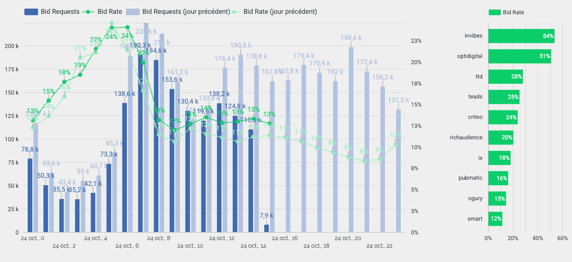
This section helps you understand the volume and quality of the traffic you are sending to your partners :
Bid Requests: The total number of times a specific bidder is called to participate in an auction.
Bid Rate: The percentage of those requests that actually receive at least one bid back from the SSP.
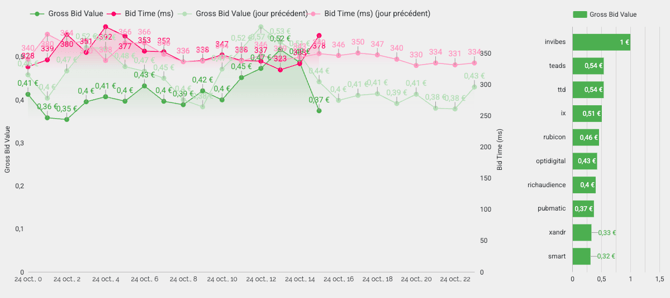
Efficiency is just as important as revenue. This section evaluates how "responsive" your partners are :
The Golden Rule: A high bid value paired with a low bid time suggests a highly efficient and competitive SSP. If bid times increase while value stays flat, the resulting latency might cause you to lose out on auctions entirely.
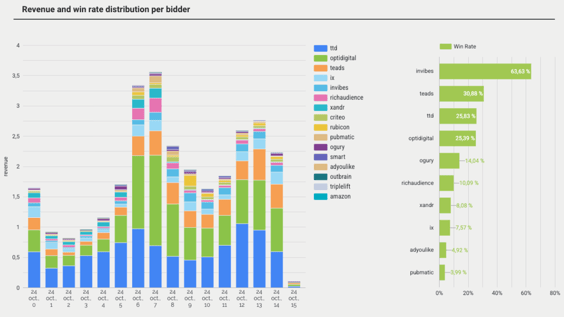
This visual breakdown shows how demand translates into actual revenue.
Revenue per Bidder: The share of your total revenue attributed to each specific partner.
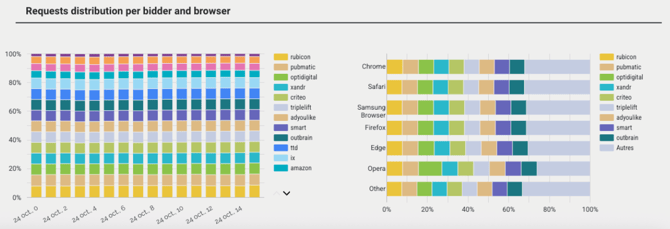
Understanding "where" your requests are going is vital for troubleshooting.
Safari Optimization: This is particularly useful for detecting Safari-specific performance gaps, which often require different optimization strategies due to tracking limitations.
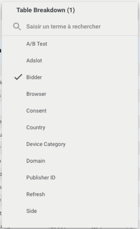
The table at the bottom of the page consolidates all metrics into a single multidimensional view. You can use the Breakdown dropdown to view data by:
Device Category (Mobile vs. Desktop) Ad Slot (Which placement performs best for which bidder?)
To learn more about how Bidder Analytics can optimize revenue, click here.